At some point, every restaurant manager has to answer a simple question: Are we actually making money on this menu?
That’s where menu engineering comes in—but it’s about more than identifying what sells. Menu engineering is about improving profitability across your entire operation. Even a small change, like increasing profit by just $1 per entrée, can translate into nearly $5M in annual impact across 300 locations when multiplied by daily volume.
That’s why getting it right matters, but if you’re still relying on spreadsheets or manual calculations, the process is slow, error-prone, and often outdated by the time you’re done. There’s a better way to do this using Crunchtime Inventory and Crunchtime Insights, and it doesn’t require any manual number crunching.
Let's review how to approach it step by step.
Step 1: Collect Your Food Cost Data Automatically
Start with accurate, timely cost data for each menu item. This is the foundation of a well-built menu. However, if you’re trying to handle all of this manually—pulling invoices, updating spreadsheets, recalculating recipes—you’re wasting valuable time and increasing the risk of mistakes. Instead, you can automate the entire process of food costing with a modern inventory management solution.
Crunchtime Inventory accurately captures all of your key data:
- Real-time inventory and on-hand counts
- Recipe-level food costs that update as supplier prices change
- Real-time sales data tied directly to menu items
- Waste and variance tracking that shows your true cost per dish
What this looks like in practice:
If the price of chicken increases this week, your chicken sandwich cost updates automatically. You don’t have to rebuild the recipe or recalculate margins; it’s all done for you. This means every day, you have a reliable current view of what it actually costs to produce every item on your menu.
The system then tracks the real-time sales of each menu item, and depletes the item and all its associated ingredients from your on-hand inventory data each time a customer places an order. The result is perpetual, real-time inventory data.
Step 2: Analyze Your Menu Performance
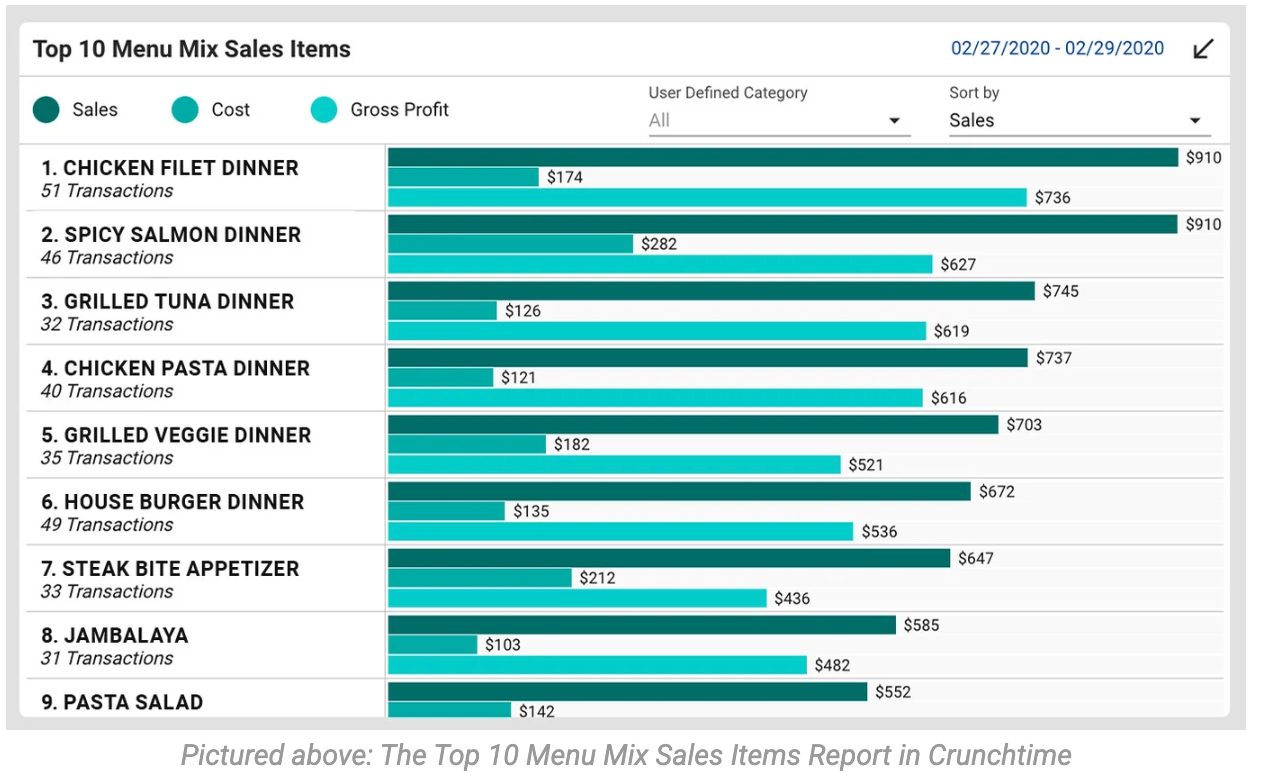
Once your food cost data is accurate and up-to-date, the next step is understanding which items are helping or hurting your margins. Start with the Top 10 Menu Mix Report in Crunchtime Inventory. This gives you a real-time view of:
- Your best-selling menu items
- Their associated costs
- The profit each item generates
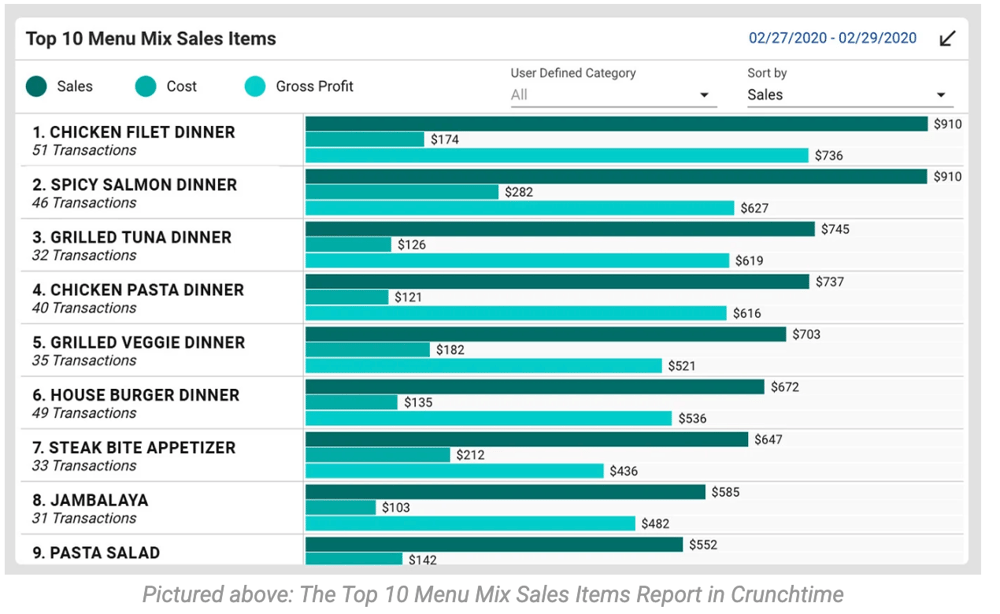
Why this matters: High sales don’t always mean high profit. For example:
- Your burger might be your top seller, but if food costs are high, it could be dragging down margins
- A pasta dish might sell less, but it generates significantly more profit per plate
This report helps you quickly spot both in real-time.
Step 3: Go Deeper with Data Visualization (No Spreadsheets Required)
Next, use Crunchtime Insights to visualize your data. Instead of building charts or working through spreadsheets, Crunchtime Insights automatically organizes your data into a clear, visual view, making it easy to understand what’s driving your menu performance at a glance.
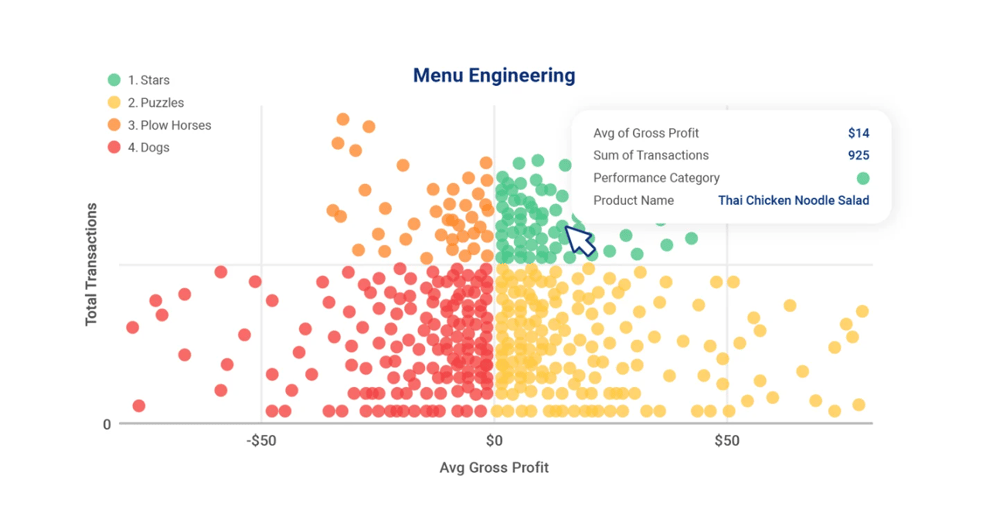
Our menu engineering template plots each item into four quadrants based on popularity and profitability.
- STARS: High Profitability, High Popularity
Your stars are menu items that are the most popular with your guests and the most profitable for you. These are your superstar menu items that should be promoted whenever possible.
- PLOW HORSES: Low Profitability, High Popularity
The solid-performing plow horses are products that guests love but have higher food costs. When possible, evaluate plow horse costs, menu price, or portion size for these menu items.
- PUZZLES: High Profitability, Low Popularity
These products would bring you high profitability if only your customers would order them more often. They're a puzzle to figure out. These dishes challenge you to increase their popularity without increasing the cost to make them.
- DOGS: Low Profitability, Low Popularity
Dogs are neither profitable nor popular among guests. These menu items should be evaluated to determine if they can be cut from the menu.
Learn more about how to use a menu engineering matrix here.
What if data analytics isn’t your strength?
In reality, many restaurant operators skip deeper analysis because it takes too much time, or the raw data isn’t easy to interpret. When you’re looking at spreadsheets full of numbers like food cost %, daily sales, and margins, it’s not always obvious what actually matters.
With the AI Analyst in Crunchtime Insights, you can simply ask a question like “What are my top-selling menu items this month across all Southeast locations?” and get a clear answer instantly—no digging through reports required.
Crunchtime Insights turns your sales and cost data into a simple, easy-to-read view of performance with a menu engineering matrix. Instead of analyzing rows of data, you can quickly see what’s working without digging through spreadsheets.
Step 4: Take Action on Your Menu – Backed by Data
Now you know where each item stands, so you can make data-backed decisions to improve your menu. The goal isn’t to turn every item into a “Star”—that’s rarely realistic for most operators. Instead, aim for a balanced menu by making small, strategic adjustments across each menu item.
Here’s how to take action:
Optimize your high-volume items (Plow horses)
These are popular items but not very profitable. These items likely bring in repeat customers who purchase additional items as well, so you need to approach these carefully.
For example, your steak sandwich sells well, but has a high food cost. Here is what you can try:
- Test a variation with a lower-cost cut or portion adjustment
- Introduce an alternative (like a chicken sandwich) with better margins
Adjusting your menu or recipes can seem like a daunting task, but Crunchtime Inventory makes it easy to model recipe changes before rolling them out. Simply enter your theoretical menu items with their associated costs, and Crunchtime will show you the cost impact upfront. This is a critical step to help you avoid building a menu with too many plowhorses and not enough stars.
Promote your high-margin items (Puzzles)
These items make money—but don’t sell enough. The goal is to encourage more sales of this item.
For example:
- Move the item to a more prominent spot on the menu
- Feature it in a special or bundle
- Train staff to recommend it
If the item is still not selling well after taking the steps above, consider collecting customer feedback through a survey to find out why customers are not choosing this item. It might be time to rework the item or remove it altogether.
Protect your best performers (Stars)
Don’t mess with what’s working well on your menu.
For example:
- Keep pricing competitive but profitable
- Continue to highlight these items in marketing
- Ensure consistency across all store locations
Fix or remove underperformers (Dogs)
If an item isn’t selling and isn’t profitable, it’s taking up valuable space.
For example:
- Simplify the recipe
- Replace it with a more profitable alternative
- Remove it entirely
“With Crunchtime Inventory, recipe development isn’t just about creativity—it incorporates cost from the start. As our culinary leaders ideate and build new menu items, we can use Crunchtime to model recipes in real time, so we know exactly how each item will impact our profitability before it goes live.” - Barbara Stanley, Corp Director, Revenue Systems & Analytics at Herschend Family Entertainment - 180 dining locations
Final Thoughts
Menu engineering isn’t new, but the speed required to do it well has changed. Restaurants that rely on manual processes or spreadsheets:
- Spend hours building reports
- Work with outdated data
- Miss opportunities to improve margins
Menu engineering is most effective when it’s grounded in real data, not guesswork. The key is to make it part of your day-to-day operations—not something you revisit once a quarter. With the right tools in place, you’re not just reviewing your menu blindly; you’re able to continuously improve it in real-time.
Restaurants using Crunchtime Inventory + Insights:
The difference shows up directly in your restaurant’s profitability.
Ready to see it in action? Schedule a demo.